Skip to content

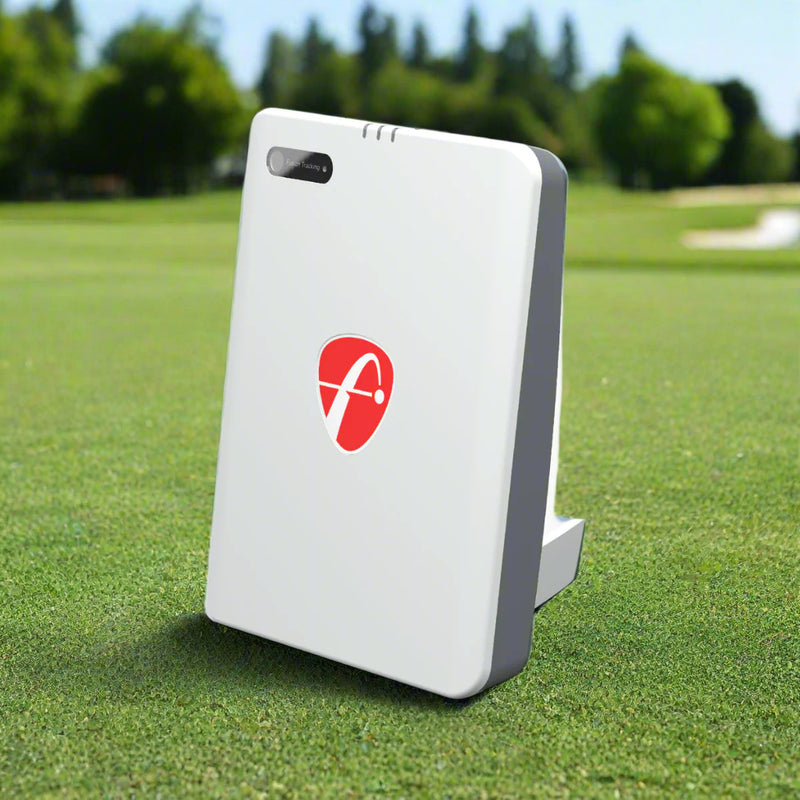
FlightScope Mevo Gen2 Portable Launch Monitor and Golf Simulator

SKU MevoGen2
Save $150.00 Save $150.00
Original price $1,299.00
Original price $1,299.00 - Original price $1,299.00
Original price $1,299.00
Current price $1,149.00
$1,149.00 - $1,149.00
Current price $1,149.00

Complete Your Setup

Complete your setup with these optional extras.

Software
Golf club with digital display from the FlightScope Face Impact Location on a tablet screen, set against a golf course background
Learn more
$299.00 USD

FlightScope Face Impact Location Software

FlightScope Face Impact Location Software

FlightScope Face Impact Location Software | MPIL Improve your ball striking with clear visual feedback that shows exactly where you are making contact on the club face. FlightScope Face Impact Location is a powerful software upgrade designed to help golfers understand strike quality, contact patterns, and consistency with every club in the bag. Instead of guessing whether contact was high, low, toward the heel, or toward the toe, Face Impact Location gives you precise impact feedback after every shot. This helps you connect what you feel in the swing with what actually happened at impact. With lateral impact, vertical impact,...

View full product details
Tablet showing a female golfer finishing her swing on the range with FlightScope Pro Package data readouts for club path, V plane, FTP, low point, FTT, dynamic loft, H plane and AOA
Learn more
$599.00 USD

FlightScope Pro Package Software

FlightScope Pro Package Software

FlightScope Pro Package Software | Advanced Golf Performance Software | MPPP Unlock advanced club and ball data with the FlightScope Pro Package Software. Designed for golfers who want a deeper understanding of how the club moves through impact, this software upgrade gives compatible Mevo+ and Mevo Gen2 users access to more detailed swing and shot feedback. Instead of only seeing what the ball did, the Pro Package helps explain why the ball flew the way it did. With added metrics like club path, face to path, face to target, dynamic loft, swing plane, low point, curve, and club speed profiles,...

View full product details
FlightScope Pro Package and Face Impact Location app screens showing a golfer swing with club path and dynamic loft data on a tablet, and a wedge clubface heat map with shot data on a phone
Learn more
$850.00 USD

FlightScope Pro Package & Face Impact Location Bundle

FlightScope Pro Package & Face Impact Location Bundle

FlightScope Mevo+ Pro Package and Face Impact LocationUnlock deeper club data, impact feedback, and advanced shot analysis with the FlightScope Mevo Plus Pro Package and Face Impact Location. Designed for golfers who want more than basic ball flight numbers, this software upgrade gives your Mevo+ or Mevo Gen2 the tools needed to better understand your swing, contact, and performance.The Pro Package adds advanced club and ball metrics including club path, face to path, face to target, dynamic loft, swing plane, low point, curve, and club speed profiles. These data points help you see how the club is moving through impact,...

View full product details

Book a Free Studio Design Consult

Not sure it fits your room? Talk with a specialist first: (619) 927-6193

  • Free shippingOn eligible FlightScope products
  • Arrives in 5 to 8 business daysFor in stock items. Custom and backordered items may take longer.
  • Price match guaranteeFound it for less at an authorized US retailer? We'll match it.

Pairs Well With

Everything else you need for a complete golf room.

Want the whole room planned? Get a free studio design

The FlightScope Mevo Gen2 is a pocket size radar and camera launch monitor that measures 20 ball and club data parameters indoors or outdoors, with no subscription for core data. It sits on the floor behind the ball, runs up to 6 hours on a charge and includes 8 E6 Connect courses.

Quick answers

  • Best for: a first home simulator or garage setup on a budget, and golfers who also want to take their launch monitor to the range.
  • Not for: players who want club path, face angle and face impact data out of the box. Those are optional Pro Package and Face Impact Location upgrades on the Mevo Gen2, and standard on the FlightScope X3C.
  • Room depth: place the Mevo Gen2 about 8 ft behind the ball (7 to 9 ft) with at least 8 ft of ball flight to the screen, so plan on at least 15 ft from the unit to the screen.
  • Balls indoors: for accurate spin indoors, use Titleist RCT balls or golf balls with an aluminum sticker.
  • Software: 8 E6 Connect courses are included, and it also works with Awesome Golf and GSPro. See our golf simulator software guide.

How it compares

  • Mevo Gen2 vs X3C: the X3C measures 50 parameters, tracks the ball to landing outdoors and includes face impact location, for $11,995. The Mevo Gen2 covers the core ball and club numbers most home golfers use for about a tenth of the price.

Buying from Elite Swing Studio

  • Authorized FlightScope dealer.
  • Free curbside shipping. In stock orders are estimated to arrive in 5 to 8 business days, with tracking sent within 24 hours of the order leaving the warehouse.
  • Price match on the same product in stock at an authorized online retailer without a physical store. Rebates, auction sites and annual sales like Black Friday and Cyber Monday are excluded.
  • Synchrony financing at checkout, subject to credit approval. See our financing guide.
  • Free help planning your room and setting up by phone, text or a free 30 minute consult. We ship the equipment and do not install it.

100% American Owned & Operated

We're a locally Owned & Operated Business

Lifetime Support

Real help from a real person, for as long as you own it.

Secure Online Payment System

All our transactions are protected and secure

Price Match Guarantee

Found it for less at an authorized US retailer? We'll match it.

White FlightScope Mevo Gen 2 launch monitor standing on turf in a home simulator room, with a golf ball nearby and a course projected on the screen behind it

FlightScope Fusion Tracking

Combines 3D Doppler radar with synchronized image processing for accurate club and ball data.
  • 20 essential data parameters
  • Full swing, chipping, and putting data
  • No subscription required for core data
  • Compatible with E6 Connect, Awesome Golf, and GSPro
A female golfer finishing her swing on a driving range with the FlightScope Mevo Gen 2 on the turf in front of her, overlaid with a red ball flight trace showing height, carry distance and ball speed

Indoor And Outdoor Use

Use Mevo Gen2 in a home simulator, garage setup, practice bay, driving range, or outdoor training space.
  • 7 to 9 feet from sensor to tee for full swing
  • Rechargeable battery with up to 6 hours of use
  • USB C charging
  • Built for home simulators, garage setups, practice bays, and speed training
Tablet showing the FS Golf app swing video gallery, with a recorded swing clip, a club path line overlay, and readouts for carry, roll, total distance, lateral and curve distance, club speed and ball speed

Built In Camera For Swing Video

Record swing clips through the FS Golf app and review video with optional data overlays.
  • Optional data overlay on saved swing clips
  • FS Golf Practice App for iOS, Android, and PC
  • Swing Training Mode for practice without hitting a ball
  • Compatible with The Stack System and SuperSpeed weighted clubs
Tablet showing a golfer finishing his swing on a driving range with a yellow shot trace overlay and readouts for carry, ball speed, club speed, spin, height and launch angle from the FlightScope Mevo Gen 2

FS Golf Practice App Access

Review shot data, trajectories, video, and performance trends through the FS Golf app.
  • FS Skills Challenges App for added competition
  • 8 course E6 Connect bundle included for iOS and PC
  • Track shot data, trajectories, and performance trends
  • Review saved video and swing history in the app

Product Resources & Downloads

Questions about the FlightScope Mevo Gen2 Portable Launch Monitor and Golf Simulator

How much room does the Mevo Gen2 need indoors?

Place it about 8 ft behind the ball (7 to 9 ft) with at least 8 ft of ball flight to your screen or net, so plan on at least 15 ft from the unit to the screen. For putting, it sits 5 ft behind the ball with at least 8 ft of flat roll.

Do I need special golf balls for the Mevo Gen2?

For accurate spin indoors, yes. Use Titleist RCT balls or golf balls with an aluminum sticker. Outdoors with full ball flight, regular balls work.

Does the Mevo Gen2 need a subscription?

No. Core data, firmware updates and software fixes are free. The Pro Package (more club data) and Face Impact Location are optional one time upgrades.

Can I return the Mevo Gen2?

You can cancel for a full refund any time before the order ships. After it ships, returns must be unopened and unused, a restocking fee of about 25% applies plus return shipping, and FlightScope's own return rules can limit what is accepted. Read the full refund policy and ask us before you order if you are unsure about fit.

How do warranty claims work?

Contact us first at (619) 927-6193 or info@eliteswingstudio.com and we will help you with the claim.

The FlightScope experience

Real golfers. Real insight.

Customer perspectives on practice, feedback, and improvement.

Love all the data. So helpful for improving
Todd S.Mevo Gen2 customer
Flightscope Mevo 2 is so easy to use and has already helped my game. …
Alan P.Mevo Gen2 customer
Easy to unlock new features. Love the new Mevo.
Kj S.Pro Package customer
Very valuable data. The mevo plus was easy to set up. …
Richard N.Pro Package customer
Brings to light the little things that keep me from being consistent
Larry D.Mevo Gen2 trade-in customer
All good so far. Customer service was very prompt and helpful.
John K.Mevo Gen2 trade-in customer

Selected review excerpts published by FlightScope, covering Mevo Gen2, Pro Package, and trade-in experiences. Photo from the linked review. These are not verified purchases from Elite Swing Studio.

Compare products

{"one"=>"Select 2 or 3 items to compare", "other"=>"{{ count }} of 3 items selected"}

Select first item to compare

Select second item to compare

Select third item to compare

Compare